Instantly expose your local app to the internet

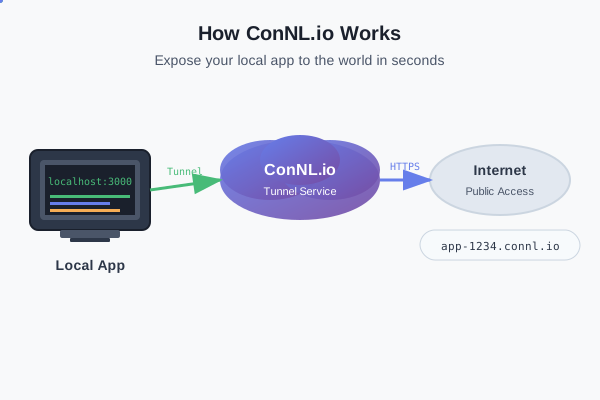
ConNL.io Tunnel Diagram

What is ConNL.io?

connl.io is a powerful and intuitive tunneling tool designed to help developers securely share and test local applications over the internet. Built with modern technology and developer experience in mind, it offers fast, reliable, and seamless performance.

With connl.io, you can:

  • Expose your local app (e.g., localhost:3000) to the internet instantly
  • Access your project via a unique subdomain (e.g., app-1290.connl.io)
  • Test webhooks, APIs, or mobile apps without complex network setup
  • Use secure HTTP/HTTPS connections for safe and encrypted communication
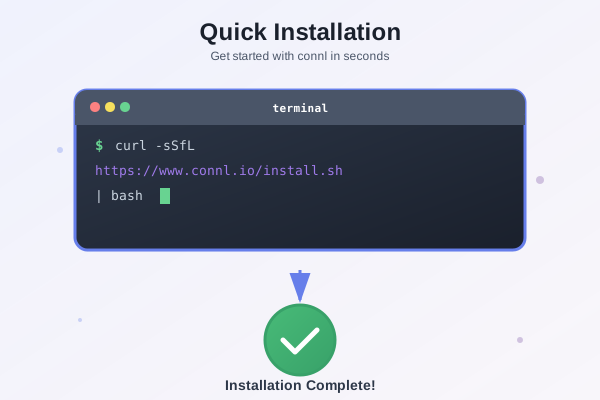
ConNL.io Installation Diagram

Getting Started with connl

Getting started with connl is quick and easy. Follow these simple steps to install it on your Mac or Linux system using cURL.

Step :Install connl using

Terminal
$ curl -sSfL https://www.connl.io/install.sh | bash

Connl is now ready to use!.

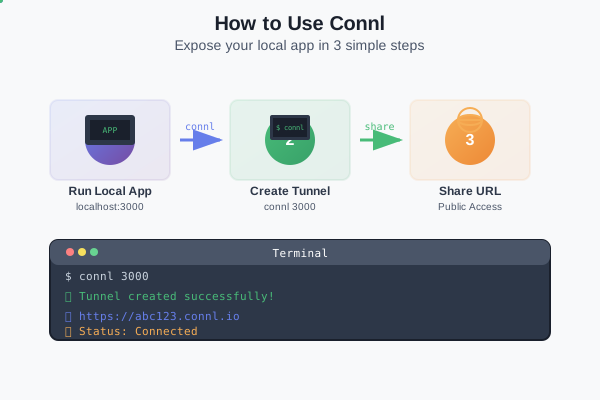
ConNL.io Usage Diagram

How to Use Connl

Using connl is simple and developer-friendly. Once installed, you can instantly expose any local application to the internet.

Step 1: Run your local app Make sure your web app or API is running on a local port, for example:

Terminal
$ npm run dev
vite dev --port 3000
VITE v3.2.4 ready in 537 ms
➜ Local: http://localhost:3000/

Step 2: Start a tunnel with connl

Terminal
$ connl 3000
Connected the Sever
host: http://app-4796.connl.io